Are you having trouble reading a Volkswagen EDC17C74 ECU on bench mode using Xhorse Multi-Prog? The software error shows: “Failed to load S0.”
If you are stuck on this screen, don’t worry. Follow the troubleshooting steps below to resolve the issue and get your device reading properly.
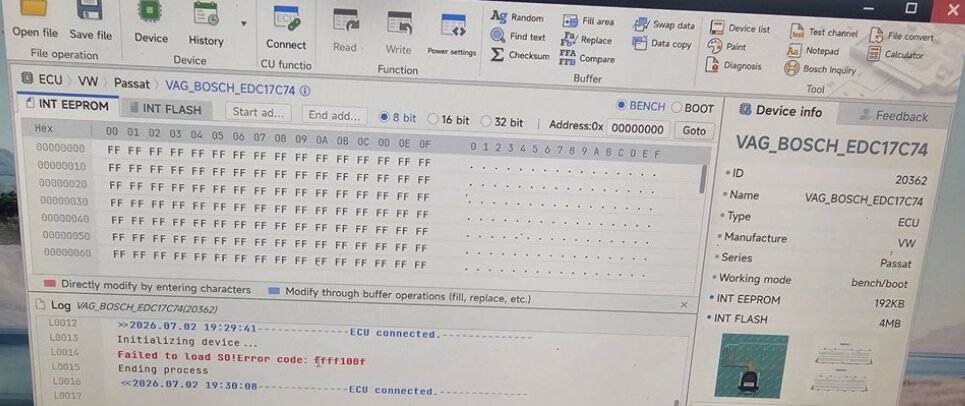
Troubleshooting Checklist
It is usually triggered by power, network, or hardware connection issues. Check the following three areas:
- Stable Power Supply: Ensure your voltage input is sufficient. The voltage must be maintained at above 13.5V for successful bench reading.
- Network Status: Multi-Prog software requires a stable server handshake. Check your network configuration to ensure your internet connection has not dropped.
- Wiring Verification: Double-check your bench pinouts and wiring harness. A single loose or misplaced pin connection can cause the boot/bench reading process to fail.
What to Do Next?
Expert Tip: If you have thoroughly verified the voltage, internet connection, and wiring, but the error persists, use the software’s built-in tool to send a diagnostic report to Xhorse engineers for further technical analysis.
Tech support:
Whatsapp/Wechat(Lucy): +86 15387077565
Email: sales@xhorseshop.co.uk
Skype: xhorseshop.co.uk
Leave a Reply