When servicing Xhorse Dolphin XP005 automatic key cutting machine, you may encounter a scenario where the battery cells are healthy, but the Battery Management System (BMS) board exhibits abnormal behavior.
To maintain the battery cells safely and prevent permanent damage under these conditions, follow this precise hardware sequence.
Step-by-Step Maintenance
- Safe Disassembly Sequence
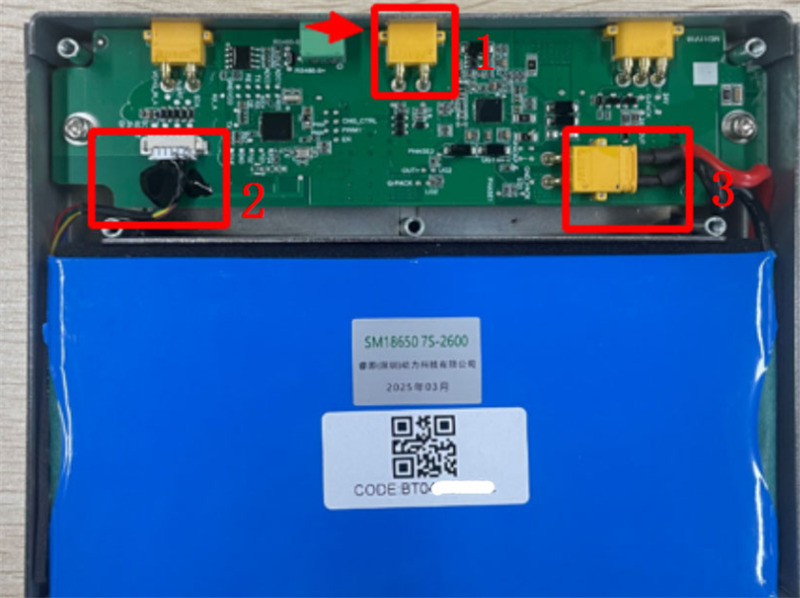
To avoid short circuits or unexpected voltage spikes on a malfunctioning BMS board, you must disconnect the components in a specific order:
Action: Remove the connections strictly in the order of 1 ➔ 2 ➔ 3 (refer to your hardware diagram).
- Reconnection Sequence
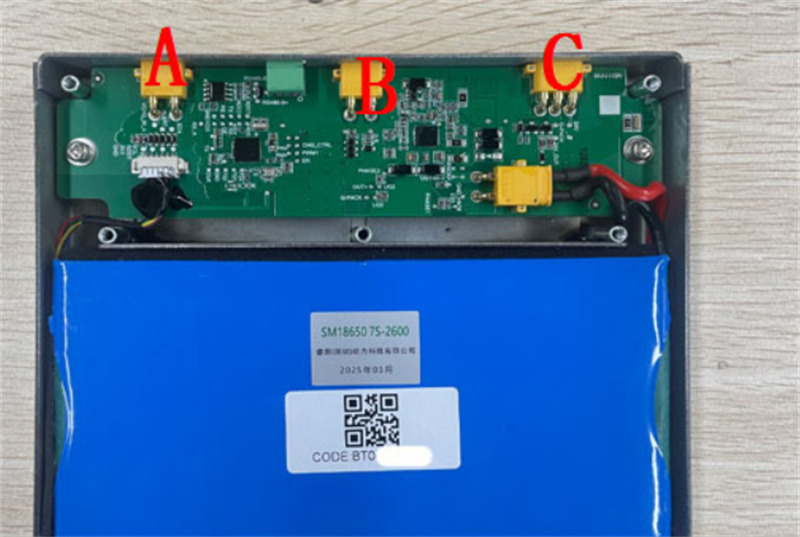
When reassembling or staging the battery pack for testing, the order of connection is critical to protect the logic gates of the board:
Action: Secure the battery ports sequentially from A ➔ B ➔ C.
- Power Management & Over-Discharge Prevention
Because the BMS board is abnormal, it may fail to cut power automatically when the battery drops below its safe voltage threshold.
Critical Maintenance:
Keep Dolphin XP005 machine powered directly via the DC power adapter. Do not allow the machine to run solely on battery power or drain the cells completely. Constant adapter power prevents severe over-discharge, which can permanently destroy otherwise healthy lithium cells.
Leave a Reply